
Project Overview
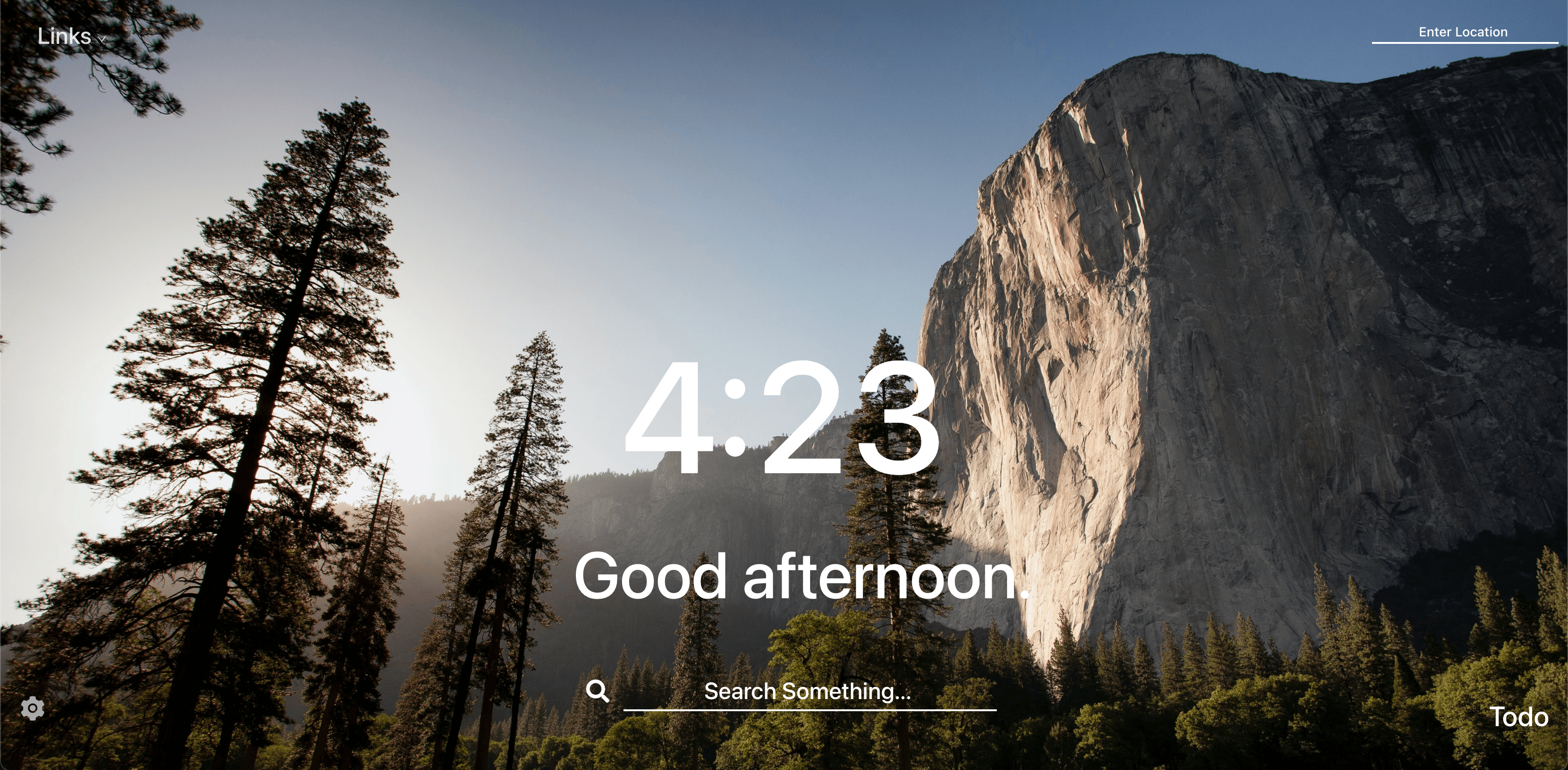
Momentum Clone is a React application inspired by the popular Google Chrome extension "Momentum." It serves as a daily dashboard, featuring a clock and a greeting message that changes based on the time of day. The app also displays a stunning background image fetched randomly from Unsplash's API.
This project was my introduction to React and allowed me to combine my passion for design with front-end development. It demonstrates my ability to work with APIs, implement responsive design, and create an intuitive user interface that enhances productivity.
Technologies
Project Showcase
Key Features
Dynamic Backgrounds
Beautiful, high-quality background images fetched from Unsplash API that refresh with each visit, creating a unique experience every time.
Time-Based Greetings
Personalized greetings that change based on the time of day (morning, afternoon, evening), creating a more engaging user experience.
Digital Clock
Real-time digital clock that updates every second, displaying the current time in a clean, easy-to-read format.
Weather Information
Current weather conditions and temperature displayed based on the user's location, providing useful information at a glance.
Focus of the Day
Feature that allows users to set and track their main focus for the day, helping to improve productivity and goal achievement.
Responsive Design
Fully responsive layout that works seamlessly across all devices, from desktop computers to mobile phones.
Development Process
Planning & Design
I began by analyzing the original Momentum extension to understand its core features and user experience. I created wireframes to plan the layout and user interface, focusing on simplicity and visual appeal. The design needed to be clean and unobtrusive, allowing users to focus on their tasks while still providing useful information.
I chose a minimalist color scheme and typography that would complement a variety of background images, ensuring that text would remain readable regardless of the image displayed behind it.
Implementation
I built the application using React, leveraging its component-based architecture to create modular, reusable UI elements. I implemented state management to handle user inputs and dynamic content changes. The integration with the Unsplash API required handling asynchronous requests and implementing error handling to ensure a smooth user experience.
Tailwind CSS was used for styling, allowing for rapid development and consistent design across the application. I implemented responsive design principles to ensure the dashboard looked great on all screen sizes, from desktop monitors to mobile devices.
Challenges & Solutions
API Integration
Challenge: Integrating with the Unsplash API to fetch high-quality background images while managing API rate limits and handling potential network failures.
Solution: Implemented efficient API calls with proper error handling and fallback mechanisms. Used local storage to cache images temporarily, reducing the number of API calls and ensuring the application would still display a background even if the API was unavailable.
Text Readability
Challenge: Ensuring text remained readable against a variety of background images with different colors, brightness levels, and patterns.
Solution: Implemented a subtle gradient overlay that adapts to the background image, providing sufficient contrast for text elements without significantly diminishing the visual impact of the background. Added text shadows and semi-transparent backgrounds for critical information to ensure readability in all conditions.
Technical Details
- →
React Components: Built with functional components and React Hooks for state management and side effects.
- →
API Integration: Used fetch API to retrieve random high-quality images from Unsplash and weather data based on geolocation.
- →
Local Storage: Implemented browser local storage to persist user preferences and daily focus across sessions.
- →
Responsive Design: Used Tailwind CSS for a mobile-first approach, ensuring the dashboard looks great on all devices.
- →
Performance: Optimized image loading and implemented lazy loading for better performance, especially on slower connections.
See It In Action
Experience the Momentum Clone dashboard for yourself. The live demo showcases all features and functionality of this productivity-enhancing application.